Appearance
PostgreSQL - Cookbook
A long list of things in the shortest possible way.
Data types
| Name | Description |
|---|---|
BIGINT | Signed eight-byte integer |
BIGSERIAL | Autoincrementing eight-byte integer |
BOOLEAN / BOOL | Logical Boolean (true/false) |
VARCHAR | Variable-length character string |
CIDR | IPv4 or IPv6 network address |
DATE | Calendar date (year, month, day) |
DOUBLE PRECISION | Double precision floating-point number (8 bytes) |
INET | IPv4 or IPv6 host address |
INTEGER / INT | Signed four-byte integer |
INTERVAL | Time span |
JSON | Textual JSON data |
MONEY | Currency amount |
NUMERIC | Exact numeric of selectable precision |
REAL | Single precision floating-point number (4 bytes) |
SMALLINT | Signed two-byte integer |
SMALLSERIAL | Autoincrementing two-byte integer |
SERIAL | Autoincrementing four-byte integer |
TEXT | Variable-length character string |
TIME | Time of day (no time zone) |
TIMETZ | Time of day, including time zone |
TIMESTAMP | Date and time (no time zone) |
TIMESTAMPTZ | Date and time, including time zone |
XML | XML data |
Numeric types limits
Numeric types have hard limits which values are possible.
| Name | Minimum | Maximum |
|---|---|---|
SMALLINT / INT2 | -32 768 | 32 767 |
INTEGER / INT | -2,147 ∙ 109 | 2,147 ∙ 109 |
BIGINT / INT8 | -9,223 ∙ 1018 | 9,223 ∙ 1018 |
SMALLSERIAL | 1 | 32 767 |
SERIAL | 1 | 2,147 ∙ 109 |
BIGSERIAL | 1 | 9,223 ∙ 1018 |
Float numbers
Inexact options for precision numbers are REAL and DOUBLE PRECISION also known as FLOAT4 and FLOAT8 respectively. REAL variables are saved with 6 decimal digit and DOUBLE PRECISION with 15 decimal digit precision.
For more exact control of number precions NUMERIC should be used. The precision of a NUMERIC is the total count of digits in the whole number. The scale of a NUMERIC is the count of decimal digits.
sql
NUMERIC(precision, scale)
NUMERIC(precision, scale)
1
The NUMERIC datatype can save up to 131 072 digits before the decimal point or up to 16 383 digits after the decimal point.
Examples of numeric parameters:
| Number | Precision | Scale |
|---|---|---|
| 189.56 | 5 | 2 |
| 23.5141 | 6 | 4 |
| 1.6672231 | 8 | 7 |
| 3142627.1 | 8 | 1 |
| 123.123 | 6 | 3 |
Date, time and timestamps
Limits for date and time variables.
| Name | Minimum | Maximum | Resolution |
|---|---|---|---|
TIMESTAMP | 4713 BC | 294276 AD | 1 microsecond |
TIMESTAMPTZ | 4713 BC | 294276 AD | 1 microsecond |
DATE | 4713 BC | 5874897 AD | 1 day |
TIME | 00:00:00 | 24:00:00 | 1 microsecond |
TIMETZ | 00:00:00+1559 | 24:00:00-1559 | 1 microsecond |
INTERVAL | -178000000 years | 178000000 years | 1 microsecond |
Recommended formats:
sql
-- Date (YYYY-MM-DD)
2020-10-28

-- Time (HH:mm:ss)
01:23:06.789

-- Time with milliseconds (HH:mm:ss.[sss])
01:23:06.789

-- Timezone (abbreviation, time zone name or ISO-8601)
GMT
Europe/Helsinki
+2:00

-- Timestamp
2020-10-28 01:23:06.789

-- Timestamp with time zone
2020-10-28 01:23:06.789 +2:00
-- Date (YYYY-MM-DD)
2020-10-28

-- Time (HH:mm:ss)
01:23:06.789

-- Time with milliseconds (HH:mm:ss.[sss])
01:23:06.789

-- Timezone (abbreviation, time zone name or ISO-8601)
GMT
Europe/Helsinki
+2:00

-- Timestamp
2020-10-28 01:23:06.789

-- Timestamp with time zone
2020-10-28 01:23:06.789 +2:00
1
2
3
4
5
6
7
8
9
10
11
12
13
14
15
16
17
18
19
2
3
4
5
6
7
8
9
10
11
12
13
14
15
16
17
18
19
Enums
Enums are awesome for forcing set of values which Postgres don't have.
sql
CREATE TYPE USER_ROLE AS ENUM (
	'admin',
	'author',
	'editor',
	'guest'
);
CREATE TYPE USER_ROLE AS ENUM (
	'admin',
	'author',
	'editor',
	'guest'
);
1
2
3
4
5
6
2
3
4
5
6
Creating tables
Create users table with id column as a primary key.
sql
CREATE TABLE users (
	-- auto incrementing id
	id SERIAL PRIMARY KEY,

	first_name VARCHAR(32) NOT NULL,
	last_name VARCHAR(32) NOT NULL,
	email VARCHAR(128) NOT NULL UNIQUE,
	password TEXT NOT NULL,
	is_activated BOOLEAN DEFAULT false,

	-- enum with default value set to 'guest'
	role USER_ROLE DEFAULT 'guest' NOT NULL,

	birthday DATE NOT NULL,
	time_of_death TIMESTAMPTZ,

	street_address VARCHAR(128),
	city VARCHAR(32),
	country VARCHAR(32),
	postal_code NUMERIC(5),

	height NUMERIC(5, 2) CHECK (height BETWEEN 40 AND 240),
	weight NUMERIC(5, 2) CHECK (weight > 1),
	shoe_size SMALLINT,

	-- default the creation time to NOW() value
	created_at TIMESTAMP DEFAULT NOW() NOT NULL,
	updated_at TIMESTAMP
);
CREATE TABLE users (
	-- auto incrementing id
	id SERIAL PRIMARY KEY,

	first_name VARCHAR(32) NOT NULL,
	last_name VARCHAR(32) NOT NULL,
	email VARCHAR(128) NOT NULL UNIQUE,
	password TEXT NOT NULL,
	is_activated BOOLEAN DEFAULT false,

	-- enum with default value set to 'guest'
	role USER_ROLE DEFAULT 'guest' NOT NULL,

	birthday DATE NOT NULL,
	time_of_death TIMESTAMPTZ,

	street_address VARCHAR(128),
	city VARCHAR(32),
	country VARCHAR(32),
	postal_code NUMERIC(5),

	height NUMERIC(5, 2) CHECK (height BETWEEN 40 AND 240),
	weight NUMERIC(5, 2) CHECK (weight > 1),
	shoe_size SMALLINT,

	-- default the creation time to NOW() value
	created_at TIMESTAMP DEFAULT NOW() NOT NULL,
	updated_at TIMESTAMP
);
1
2
3
4
5
6
7
8
9
10
11
12
13
14
15
16
17
18
19
20
21
22
23
24
25
26
27
28
29
2
3
4
5
6
7
8
9
10
11
12
13
14
15
16
17
18
19
20
21
22
23
24
25
26
27
28
29
Relationships
Creating relations between tables are done with REFERENCES statement. Before adding rows to addresses and user_info tables referenced user must exist.
sql
CREATE TABLE users (
	id SERIAL PRIMARY KEY,
	first_name VARCHAR(32) NOT NULL,
);

CREATE TABLE addresses (
	id SERIAL PRIMARY KEY,
	street_address VARCHAR(128),

	-- Reference to users.id
	user_id INT REFERENCES users (id)
);

CREATE TABLE user_info (
	id SERIAL PRIMARY KEY,
	user_id INT,

	-- Reference to users.id with FOREIGN KEY constraint
	FOREIGN KEY (user_id)
		REFERENCES users (id)
);
CREATE TABLE users (
	id SERIAL PRIMARY KEY,
	first_name VARCHAR(32) NOT NULL,
);

CREATE TABLE addresses (
	id SERIAL PRIMARY KEY,
	street_address VARCHAR(128),

	-- Reference to users.id
	user_id INT REFERENCES users (id)
);

CREATE TABLE user_info (
	id SERIAL PRIMARY KEY,
	user_id INT,

	-- Reference to users.id with FOREIGN KEY constraint
	FOREIGN KEY (user_id)
		REFERENCES users (id)
);
1
2
3
4
5
6
7
8
9
10
11
12
13
14
15
16
17
18
19
20
21
2
3
4
5
6
7
8
9
10
11
12
13
14
15
16
17
18
19
20
21
Many-to-many relations
In many-to-many relations one table works as a link between two. This way user_groups can have multiple permissions attached to it.
sql
CREATE TABLE permissions (
	name VARCHAR(128) PRIMARY KEY,
	description TEXT
);

CREATE TABLE user_groups (
	id SERIAL PRIMARY KEY,
	name VARCHAR(32) UNIQUE NOT NULL
);
CREATE TABLE permissions (
	name VARCHAR(128) PRIMARY KEY,
	description TEXT
);

CREATE TABLE user_groups (
	id SERIAL PRIMARY KEY,
	name VARCHAR(32) UNIQUE NOT NULL
);
1
2
3
4
5
6
7
8
9
2
3
4
5
6
7
8
9
The "middle" table references both tables above. With ON DELETE policies set when someone wants to remove a permission that is still referenced by an user_group_permissions table, it is not allowed. If someone removes an user group, all the group's permissions are removed as well from user_group_permissions table.
sql
CREATE TABLE user_group_permissions (
	permission_name VARCHAR(128)
		REFERENCES permissions (name) ON DELETE RESTRICT,

	group_id INTEGER
		REFERENCES user_groups (id) ON DELETE CASCADE,

	-- True if user has this power, false otherwise
	value BOOLEAN DEFAULT false NOT NULL,

	-- Multicolumn primary key
	PRIMARY KEY (permission_name, group_id)
);
CREATE TABLE user_group_permissions (
	permission_name VARCHAR(128)
		REFERENCES permissions (name) ON DELETE RESTRICT,

	group_id INTEGER
		REFERENCES user_groups (id) ON DELETE CASCADE,

	-- True if user has this power, false otherwise
	value BOOLEAN DEFAULT false NOT NULL,

	-- Multicolumn primary key
	PRIMARY KEY (permission_name, group_id)
);
1
2
3
4
5
6
7
8
9
10
11
12
13
2
3
4
5
6
7
8
9
10
11
12
13
On delete relationship
The ON DELETE clause specifies what action is performed when a referenced row in the referenced table is deleted.
| Clause | Description |
|---|---|
NO ACTION | Prevents deletion of a referenced row. (Default) |
RESTRICT | Prevents deletion of a referenced row. |
CASCADE | Referenced rows should be automatically deleted. |
SET NULL | The referencing column in referenced rows should be set nulls. |
SET DEFAULT | The referencing column in referenced rows should be set default value. |
Editing tables
Rename the table.
sql
ALTER TABLE users RENAME TO app_users;
ALTER TABLE users RENAME TO app_users;
1
Add a new column called phone_number.
sql
ALTER TABLE users ADD COLUMN phone_number VARCHAR(32) NOT NULL;
ALTER TABLE users ADD COLUMN phone_number VARCHAR(32) NOT NULL;
1
Edit an existing column password to have different data type.
sql
ALTER TABLE users ALTER COLUMN password TYPE VARCHAR(512);
ALTER TABLE users ALTER COLUMN password TYPE VARCHAR(512);
1
Change role column's default value to "editor".
sql
ALTER TABLE users ALTER COLUMN role SET DEFAULT 'editor';
ALTER TABLE users ALTER COLUMN role SET DEFAULT 'editor';
1
Rename column street_address to address.
sql
ALTER TABLE users RENAME COLUMN street_address TO address;
ALTER TABLE users RENAME COLUMN street_address TO address;
1
Drop a column shoe_size.
sql
ALTER TABLE users DROP COLUMN shoe_size;
ALTER TABLE users DROP COLUMN shoe_size;
1
Deleting tables
Deleting table is simple and dangerous. Make backups first!
sql
DROP TABLE [IF EXISTS] users;
DROP TABLE [IF EXISTS] users;
1
Constraints
Constraints can be added to columns while creating table or added to tables after creation.
sql
ALTER TABLE users
ADD CONSTRAINT unique_email UNIQUE (email);
ALTER TABLE users
ADD CONSTRAINT unique_email UNIQUE (email);
1
2
2
Check constraints
A check constraint allows to specify the value in a certain column that must satisfy a Boolean expression.
sql
[CONSTRAINT check_constraint_name] CHECK (expression);
[CONSTRAINT check_constraint_name] CHECK (expression);
1
Example of forcing height value to be between 40 and 240 and weight larger than 1.
sql
CREATE TABLE users (
	height NUMERIC(5, 2) CHECK (height BETWEEN 40 AND 240),
	weight NUMERIC(5, 2) CHECK (weight > 1)
);
CREATE TABLE users (
	height NUMERIC(5, 2) CHECK (height BETWEEN 40 AND 240),
	weight NUMERIC(5, 2) CHECK (weight > 1)
);
1
2
3
4
2
3
4
A check constraint can also refer to several columns. The following example forces that shoe_size must be smaller than height.
sql
CREATE TABLE users (
	shoe_size SMALLINT,
	CHECK (shoe_size > 0),

	height NUMERIC(5, 2)
	CHECK (height BETWEEN 40 AND 240),

	CHECK (shoe_size < height)
);
CREATE TABLE users (
	shoe_size SMALLINT,
	CHECK (shoe_size > 0),

	height NUMERIC(5, 2)
	CHECK (height BETWEEN 40 AND 240),

	CHECK (shoe_size < height)
);
1
2
3
4
5
6
7
8
9
2
3
4
5
6
7
8
9
Unique constraints
Unique constraints ensure that the data contained in a column, or a group of columns, is unique among all the rows in the table.
sql
[CONSTRAINT unique_constraint_name] UNIQUE (column1, [ column2 ])
[CONSTRAINT unique_constraint_name] UNIQUE (column1, [ column2 ])
1
Ensure that email field is unique for each user.
sql
CREATE TABLE users (
	email VARCHAR(128) NOT NULL UNIQUE
);
CREATE TABLE users (
	email VARCHAR(128) NOT NULL UNIQUE
);
1
2
3
2
3
Ensure that first_name and last_name combo of is unique by setting group of columns as unique.
sql
CREATE TABLE users (
	first_name VARCHAR(32) NOT NULL,
	last_name VARCHAR(32) NOT NULL,
	UNIQUE (first_name, last_name)
);
CREATE TABLE users (
	first_name VARCHAR(32) NOT NULL,
	last_name VARCHAR(32) NOT NULL,
	UNIQUE (first_name, last_name)
);
1
2
3
4
5
2
3
4
5
PostgreSQL automatically creates an unique index when an unique constraint or primary key is defined for a table.
Primary keys
Primary key requires that the value is both unique and not null. Table's primary key may reference to multiple columns.
sql
[CONSTRAINT pk_constraint_name] PRIMARY KEY (column1, [ column2 ])
[CONSTRAINT pk_constraint_name] PRIMARY KEY (column1, [ column2 ])
1
Indexes
Indexes speed up queries to the table when indexed columns are used in a statements. Use following command to create index on column_name column:
sql
CREATE INDEX index_name ON table_name (column_name);
CREATE INDEX index_name ON table_name (column_name);
1
To remove an index, use the DROP INDEX command.
Manipulating data
Inserting data
Inserting data to table is done with INSERT INTO statement. Column names can be omitted if inserting in all column in right order.
sql
INSERT INTO table_name (col1, col2)
VALUES (value1, value2),
	(value3, value4);
INSERT INTO table_name (col1, col2)
VALUES (value1, value2),
	(value3, value4);
1
2
3
2
3
Insert four rows into users table (rest of the columns are omitted for readability).
sql
INSERT INTO users (first_name, last_name, height, user_role)
VALUES ('Jane', 'Doe', 193.95, 'admin'),
	('Mick', 'Pot', 175.20, DEFAULT),
	('Tom', 'Smith', 186.45, DEFAULT);
INSERT INTO users (first_name, last_name, height, user_role)
VALUES ('Jane', 'Doe', 193.95, 'admin'),
	('Mick', 'Pot', 175.20, DEFAULT),
	('Tom', 'Smith', 186.45, DEFAULT);
1
2
3
4
2
3
4
Editing data
Data in the table is updated with UPDATE statement.
sql
UPDATE table_name
SET column = new_value
[WHERE condition]
UPDATE table_name
SET column = new_value
[WHERE condition]
1
2
3
2
3
Edit users which have id equal to 5, 8 or 13.
sql
UPDATE users
SET user_role = 'guest', first_name = 'Mike'
WHERE id IN (5, 8, 13);
UPDATE users
SET user_role = 'guest', first_name = 'Mike'
WHERE id IN (5, 8, 13);
1
2
3
2
3
Removing data
Rows can be deleted with DELETE statement.
sql
DELETE FROM table_name
[WHERE condition]
DELETE FROM table_name
[WHERE condition]
1
2
2
Delete rows which have last_name equal to "Smith".
sql
DELETE FROM users
WHERE last_name = 'Smith';
DELETE FROM users
WHERE last_name = 'Smith';
1
2
2
Delete all rows from table aka truncate.
sql
DELETE FROM table_name;
DELETE FROM table_name;
1
Querying data
Select columns from tables by comma-separated list. All columns can be selected with *.
sql
SELECT column1, column2
FROM table_name;
SELECT column1, column2
FROM table_name;
1
2
2
Functions
See list of all functions.
Math
Returns a random value in the range 0.0 <= x < 1.0.
sql
RANDOM() → DOUBLE PRECISION
RANDOM() → DOUBLE PRECISION
1
Rounds value to amount of digits.
sql
ROUND( value NUMERIC, amount INTEGER ) → NUMERIC
ROUND( value NUMERIC, amount INTEGER ) → NUMERIC
1
Approximate value of π.
sql
PI() → DOUBLE PRECISION
PI() → DOUBLE PRECISION
1
String
Converts the string to lower case.
sql
LOWER( string TEXT ) → TEXT
LOWER( string TEXT ) → TEXT
1
Converts the string to upper case.
sql
UPPER( string TEXT ) → TEXT
UPPER( string TEXT ) → TEXT
1
Extracts the substring of string starting at the start character and stopping after count of characters.
sql
SUBSTRING( string TEXT [ FROM start INTEGER ] [ FOR count INTEGER ] ) → TEXT
SUBSTRING( string TEXT [ FROM start INTEGER ] [ FOR count INTEGER ] ) → TEXT
1
Formats arguments according to a format string. Similar to the C's sprintf see here.
sql
FORMAT( format TEXT [ args ] ) → TEXT
FORMAT( format TEXT [ args ] ) → TEXT
1
Returns first n characters of the string.
sql
LEFT( string TEXT, n INTEGER ) → TEXT
LEFT( string TEXT, n INTEGER ) → TEXT
1
Returns last n characters of the string.
sql
RIGHT( string TEXT, n INTEGER ) → TEXT
RIGHT( string TEXT, n INTEGER ) → TEXT
1
Returns the number of characters in the string.
sql
LENGTH( string TEXT ) → INTEGER
LENGTH( string TEXT ) → INTEGER
1
Aggregate
Computes the average of all the non-null input values.
sql
AVG( any number ) → NUMERIC
AVG( any number ) → NUMERIC
1
Computes the number of input rows.
sql
COUNT( * ) → BIGINT
COUNT( * ) → BIGINT
1
Computes the maximum of the non-null input values.
sql
MAX( any value ) → any value
MAX( any value ) → any value
1
Computes the minimum of the non-null input values.
sql
MIN( any value ) → any value
MIN( any value ) → any value
1
Computes the sum of the non-null input values.
sql
SUM( any number ) → NUMERIC
SUM( any number ) → NUMERIC
1
Computes the median value of the non-null input values.
sql
PERCENTILE_CONT( 0.5 ) WITHIN GROUP ( ORDER BY any number ) → DOUBLE PRECISION
PERCENTILE_CONT( 0.5 ) WITHIN GROUP ( ORDER BY any number ) → DOUBLE PRECISION
1
Date and time
With date and time data types basic mathematical operations are available.
Get timestamp subfield, more info here.
sql
DATE_PART( field STRING, timestamp ) → DOUBLE PRECISION
EXTRACT( field FROM timestamp ) → DOUBLE PRECISION
DATE_PART( field STRING, timestamp ) → DOUBLE PRECISION
EXTRACT( field FROM timestamp ) → DOUBLE PRECISION
1
2
2
Truncate to specified precision, more info here.
sql
DATE_TRUNC( field STRING, TIMESTAMP ) → TIMESTAMP
DATE_TRUNC( field STRING, TIMESTAMP ) → TIMESTAMP
1
Convert Unix epoch to timestamp with time zone.
sql
TO_TIMESTAMP( DOUBLE PRECISION ) → TIMESTAMPTZ
TO_TIMESTAMP( DOUBLE PRECISION ) → TIMESTAMPTZ
1
Distinct
Duplicate rows can be eliminated with DISTINCT key word after SELECT.
sql
SELECT DISTINCT column1, column2 FROM table_name;
SELECT DISTINCT column1, column2 FROM table_name;
1
Sorting
Rows can sorted with ORDER BY clause in ascending (default) or descending order.
sql
ORDER BY expression [ASC | DESC] [NULLS FIRST | NULLS LAST]
ORDER BY expression [ASC | DESC] [NULLS FIRST | NULLS LAST]
1
Sort first by birthday and then by first_name value without overriding first order. The 2nd order by values are sorted inside previous sorted values.
sql
SELECT first_name, last_name, birthday
FROM users
ORDER BY birthday ASC, first_name DESC;
SELECT first_name, last_name, birthday
FROM users
ORDER BY birthday ASC, first_name DESC;
1
2
3
2
3
Order rows with length of a first_name column.
sql
SELECT first_name, LENGTH(first_name) AS length
FROM customer
ORDER BY length DESC;
SELECT first_name, LENGTH(first_name) AS length
FROM customer
ORDER BY length DESC;
1
2
3
2
3
Limiting and offsetting
Returned rows can be limited and skipped with LIMIT AND OFFSET.
sql
LIMIT row_count OFFSET rows_to_skip;
LIMIT row_count OFFSET rows_to_skip;
1
Get 10 row from users table skipping first 20 of them.
sql
SELECT first_name, last_name
FROM users
LIMIT 10 OFFSET 20;
SELECT first_name, last_name
FROM users
LIMIT 10 OFFSET 20;
1
2
3
2
3
Filtering
Basic arithmetical operators (=, <= etc.) are supported. Other available operators are:
| Operator | Description |
|---|---|
<> or != | Not equal |
AND | Logical operator AND |
OR | Logical operator OR |
IN | Value matches any value in a list |
BETWEEN | Value is between a range of values |
LIKE | Value matches a pattern (case sensitive) |
ILIKE | Value matches a pattern (case insensitive) |
IS NULL | Value is NULL |
NOT | Negate the result of other operators |
~ | Regular expression |
Filter returned rows with WHERE clause.
sql
WHERE conditions;
WHERE conditions;
1
Get users which height is between 175 and 185 and shoe_size is not NULL.
sql
SELECT first_name, last_name
FROM users
WHERE height BETWEEN 175 AND 185
	AND shoe_size IS NOT NULL;
SELECT first_name, last_name
FROM users
WHERE height BETWEEN 175 AND 185
	AND shoe_size IS NOT NULL;
1
2
3
4
2
3
4
Pattern Matching
Match patterns with LIKE operator. An underscore _ in pattern stands for any single character and a percent sign % matches any sequence of zero or more characters.
Get users which last_name includes "mac" or first_name doesn't end with "n".
sql
SELECT first_name, last_name
FROM users
WHERE last_name ILIKE '%mac%'
	OR first_name NOT LIKE '%n';
SELECT first_name, last_name
FROM users
WHERE last_name ILIKE '%mac%'
	OR first_name NOT LIKE '%n';
1
2
3
4
2
3
4
Regular Expressions
Get users which last_name includes "mac" or first_name doesn't end with "n" with regular expression.
asdasdasds
sql
SELECT first_name, last_name
FROM users
WHERE last_name ~ '.*mac.*'
OR first_name NOT LIKE '.*n$';
SELECT first_name, last_name
FROM users
WHERE last_name ~ '.*mac.*'
OR first_name NOT LIKE '.*n$';
1
2
3
4
2
3
4
Full list of regex escapes and constraints can be found in documentation.
Grouping
Rows can be grouped together with GROUP BY clause to produce different types of aggregates such as sums, averages and counts.
sql
GROUP BY column_name;
GROUP BY column_name;
1
Get min, max and average shoe sizes for every country from users which were born after year 1999.
sql
SELECT country,
	MIN(shoe_size) AS minimum_size,
	MAX(shoe_size) AS maximum_size,
	AVG(shoe_size) AS average_size
FROM users
WHERE birthday >= '2000-01-01'
GROUP BY country;
SELECT country,
	MIN(shoe_size) AS minimum_size,
	MAX(shoe_size) AS maximum_size,
	AVG(shoe_size) AS average_size
FROM users
WHERE birthday >= '2000-01-01'
GROUP BY country;
1
2
3
4
5
6
7
2
3
4
5
6
7
Group by having
If a table has been grouped using GROUP BY, but only certain groups are of interest, the HAVING clause can be used to eliminate groups from the result.
sql
GROUP BY column_name HAVING expression;
GROUP BY column_name HAVING expression;
1
Get average weight of users grouped by country and having the average over 100.
sql
SELECT country,
	AVG(weight) AS weight
FROM users
WHERE birthday >= '2000-01-01'
GROUP BY country
	HAVING AVG(weight) > 100;
SELECT country,
	AVG(weight) AS weight
FROM users
WHERE birthday >= '2000-01-01'
GROUP BY country
	HAVING AVG(weight) > 100;
1
2
3
4
5
6
2
3
4
5
6
Limitations of grouping
Grouping rows with non-aggregated or grouped columns are not allowed. In example below it's impossible to get first_names of users because they are grouped together by shoe_size.
sql
SELECT shoe_size,
	AVG(weight) AS average_weight,
	first_name -- ERROR: column "users.first_name" must appear in the GROUP BY clause or used in an aggregate function
FROM users
WHERE birthday <= '2000-01-01'
GROUP BY shoe_size;
SELECT shoe_size,
	AVG(weight) AS average_weight,
	first_name -- ERROR: column "users.first_name" must appear in the GROUP BY clause or used in an aggregate function
FROM users
WHERE birthday <= '2000-01-01'
GROUP BY shoe_size;
1
2
3
4
5
6
2
3
4
5
6
All rows in a users table.
| ID | First name | Shoe size | Weight |
|---|---|---|---|
| 1 | Jane | 39 | 67 |
| 2 | Tom | 39 | 75 |
| 3 | Pete | 39 | 74 |
| 4 | Mick | 42 | 88 |
With non-aggregated column in grouped SELECT clause generates problem for PostgreSQL deciding which value of three first_names to pick.
| First name | Shoe size | Average Weight |
|---|---|---|
| Jane or Tom or Pete? | 39 | 75 |
| Mick | 42 | 88 |
Joining tables
Queries can access multiple tables at once with syntax below:
sql
[LEFT | RIGHT | CROSS | INNER | FULL | SELF] JOIN table_name condition
[LEFT | RIGHT | CROSS | INNER | FULL | SELF] JOIN table_name condition
1
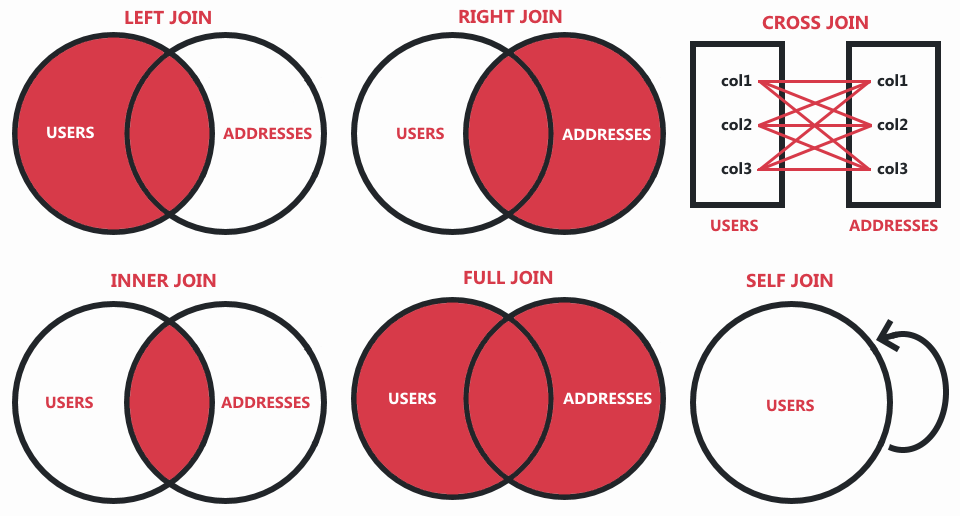
Get all users with their cities from addresses table with JOIN.
sql
SELECT users.first_name, users.last_name, addresses.city
FROM users
JOIN addresses
	ON users.id = addresses.user_id;
SELECT users.first_name, users.last_name, addresses.city
FROM users
JOIN addresses
	ON users.id = addresses.user_id;
1
2
3
4
2
3
4
Many-to-many join
Get user groups and permissions that groups have.
sql
SELECT permissions.name AS permission, user_groups.name AS group, ugp.value
	FROM permissions
JOIN user_group_permissions AS ugp
	ON permissions.name = ugp.permission_name
JOIN user_groups
	ON ugp.group_id = user_groups.id
WHERE ugp.value = true;
SELECT permissions.name AS permission, user_groups.name AS group, ugp.value
	FROM permissions
JOIN user_group_permissions AS ugp
	ON permissions.name = ugp.permission_name
JOIN user_groups
	ON ugp.group_id = user_groups.id
WHERE ugp.value = true;
1
2
3
4
5
6
7
2
3
4
5
6
7